
The Impact of Dual Computer Screen Size on Neck Discomfort
Background: Work related musculoskeletal disorders are problems experienced in a variety of vocations. Office-based tasks’ inherent static and repetitive nature introduces a unique set of ergonomic challenges. One of the most conspicuous changes in office work settings is the increasing size of computer monitors and displays. This project focused on whether or not these ever-enlarging computer screens may contribute to neck discomfort by directly measuring neck and shoulder muscle activity of participants when they are interacting with different size computer displays. Purpose: The research helped determine if there exists a statistically relevant correlation between size of display and muscle activity of the neck and shoulder. This knowledge could be used to provide information on what size monitors would best mitigate neck discomfort. Methods: Thirty volunteers performed two types of computer-interfacing tasks using dual 20†computer monitors and repeating the 2.5 minute tasks with dual 32†computer monitors: (1) typing a written script, and (2) playing a drag-and drop game. Direct bilateral measurements of activities of the sternocleidomastoid and upper trapezius were taken using surface electromyography. Additionally, each participant completed demographic and discomfort surveys following each task. Results: Muscle engagement of the left sternocleidomastoid showed statistically significant increase during the typing and drag-and-drop exercises while using the larger monitor displays. Whereas, the size of the monitors did not influence the muscle engagement of the upper trapezius during the drag-and-drop exercise, but there was a statistical significant increase for that muscle during the typing exercise. Conclusions: Larger dual monitor displays could contribute to an increase in neck discomfort for workers engaged in typing and mousing work activities.
Introduction
Beginning in the 18th century, occupational tasks were identified as causal factors of musculoskeletal disorders. Work environments and activities that contribute to or aggravate disorders and injuries of the muscles, joint, nerves, tendons, cartilage and spinal discs are work related musculoskeletal disorders [1]. Aspects of work acting as risk factors for WMSDs include forceful exertions, awkward body postures, vibration, repetitive motions and work rapidity [2]. The National Institute for Occupational Safety and Health conducted epidemiological studies to ascertain what factors contributed to the onset or recurrence of adverse medical ailments. They found that high exposure levels combined with one or more risk factors (awkward and static posture, forceful muscle exertion, repetition, and vibration) adversely affected various parts of the body. The neck was most affected by high exposure and postural elements. Poor posture, repetition and task exposure length strongly influenced shoulder WMSDs. A wide range of risk factors contributed to upper extremity WMSDs, and forceful muscle exertion proved most influential in back-related WMSDS [3].
Musculoskeletal disorders are frequent among computer users in the office workplace setting. Bergqvist, et al. [4] studied 260 medical and office personnel interfacing with workplace computers and they statistically correlated their vertical display terminal positions, repetitive movements, static and awkward postures of the upper limbs to musculoskeletal disorders. They found that computer related tasks involve varying degrees of static force on the muscles of the shoulders and neck. Villanueva, et al. [5, 6] reviewed video image analysis of individuals playing interactive computer games on computer screens set to different heights, to determine how postural adjustment relates to terminal height, using univariate analysis. Higher terminal placement triggered an individual’s line of sight to be less than 10cm below horizontal and induced pain in the neck and shoulders [7].
Pain and MSDs of the neck result from overuse of bone, cartilage, intervertebral discs, tendons, muscles and ligaments. Work related risk factors associated with neck disorders include static and awkward postures of the neck and arm, prolonged sedentary work habits and workstation design [4, 8].
Job characteristics including high-quantity and rapid input tasks, insufficient and/or short rest breaks and fixed work tasks can be neck pain stimuli. Individual risk factors including gender, age, physical activity, health, tobacco use, pre-existing conditions and anthropometry positively affect the likelihood that a worker will experience work-related MSDs [9, 10, 11]. A multitude of studies show that viewing angle and placement of computer screens influence the neck and back posture and non-ideal display settings can misalign one’s posture and lead to work related neck, back and shoulder pain. However, these studies used single monitors and displays.
The presence of dual monitors and large display units has become very popular in work environments. In 2012, 130 million desktop computers were sold compared to 179 million monitors, for a net of 49 million additional monitors. This number is indicative that more computer users are transitioning to multiple screens [12, 13]. Nimbarte, et al. [14] realized the importance of investigating what affect these larger displays have on the activity of neck muscles and the three dimensional posture of the head and neck [15, 16].
The human neck is divided into the anterior and posterior triangle. The anterior triangle is further subdivided into the inferior and superior carotid, the suprahyoid and the submaxillary. The primary muscles responsible for movement of the head and neck are the trapezius and sternocleidomastoid. A network of supporting extensor muscles in the thoracic and cervical regions of neck, including the trapezius and levator scapulae, work to support and rotate the head. The trapezius muscle is triangular and flat in shape and covers the thorax, shoulders and back of the neck. Acting alone, the upper part of the trapezius elevates the shoulders. When the upper and lower trapezius muscles act in concert, they can move the head backwards. Lateral motion of the head is achieved by independent activation of the trapezius and sternocleidomastoid.
The sternocleidomastoid is a pair of long muscles that runs along the side of the neck from the thorax to the base of the skull, behind the ear, comprising a sternal and clavicular head. If one muscle is contracted the opposite side of the face is turned. When the set of muscles are contracted concurrently the head is bent forward, towards the chest. These muscles are important to computer usage because the sternocleidomastoid influences flexion, lateral flexion and head rotation at the neck [17]. This complex muscle contains both sternal and clavicular heads. It is innervated by up-and-down and side-to-side motion.
The trapezius muscle lies in the neck’s posterior triangle and is activated during shoulder shrugs and similar movements [18]. It covers the shoulder, thorax and back of the neck and is involved in neck extension.Other neck muscles including the Scalene muscles (Anterior, Middle, and Posterior), responsible for side flexion of the head, Thyrohyoid, Sternohyoid, Omohyoid muscles, Longus muscles, Platysma muscle, are also responsible for neck/head motion. However, because this study will only use muscles that hold the head up, and uses surface EMG, these deeper muscles will not be considered. Future studies involving embedded EMG may include these muscles.
Computer screens and displays are increasing in size in workplace settings. Neck discomfort and injury is common in occupational settings where a worker interfaces at length with computer screens. Gaps in the research field of WMSDs include lack of direct measurements and small sample population sizes. Video image analysis conducted by Villanueva, et al. [5], showed how screen height affected thoracic bending, neck angle and vertical eye focus. In the case of the Bergqvist, et al. [4] study, the investigators used observation and worker self-reporting to gather data. Research conducted by Korhonen, et al. [19] investigated neck pain amongst office workers using video display units. Self-reporting questionnaires provided insight into the working conditions and individual human factors that may contribute to discomfort or pain of the neck. Statistical analysis showed an uptake of neck pain in smokers, and females experienced more discomfort than men. Their findings suggested that workstation layout and general health were robust predictors of whether or not an individual suffered neck pain.
Self-reporting and surveys can support hypotheses, but direct measurement bolsters validity to exposure assessment research. Previous studies were conducted using single monitors, or dual monitor screen sizes measuring 16 inches or less. Commonly used computer screens in workplace settings are 19 inches or greater. It is not unusual for industries to incorporate 32 inch dual monitors into their standardized workstation. Given today’s workplace setting, it is important to determine whether or not increasing the size of these computer displays could exacerbate ergonomic WMSDs. In 2012 the average PC monitor screen size was 20.4 inches, an increase in three inches over four years [20]. Multi- display terminals are growing in popularity and industry is demanding higher visual display resolution, driving the size of monitors even larger.
Previous research has used smaller population sizes and/or often compared a single monitor to a dual monitor workstation or monitor sizes between 14 and 19 inches [14, 21]. This study compared muscle activity generated when working with two configurations of dual monitors, 20 inch and 32 inch displays and also incorporated individual surveys of participants comfort levels experienced after each task in order to obtain qualitative and quantitative results. Additionally, it used larger displays and larger population sizes to analyze relationships between neck discomfort and computer screen size by measuring neck-shoulder postural muscle activity through EMG.
The project focused on whether or not increasing screen sizes in the work force may contribute to neck discomfort. Specifically, the objectives were to determine if there was a statistically significant relationship between neck muscle engagement and computer monitor screen dimensions and to determine if trends existed in the subjective comfort questionnaire.
The objective of this study was to determine whether increasing the size of computer screens increases the force exerted by the postural muscles of the neck as a computer user performs standard computer input tasks. The Ho was set as no measurable difference exists given different visual display sizes. Alternatively, the Ha would show statistically significant differences in neck muscle activity, dependent on visual display sizes.
Methods
A combination of thirty-six adults both staff members and university students volunteered to participate in the laboratory experiment. The final representation of participants, after excluding outliers and individuals that experienced neck discomfort within the last six months, yielded fifteen adult females and fifteen adult males. The mean BMI (one standard deviation) for the subjects was 25.8 (4.9). The mean age of participants was 25.6 (4.1) years of age. Twelve of the thirty participants wore glasses or contact lenses to correct their vision. The Committee for the Protection of Human Subjects’ (CPHS) approval was obtained as required for experimentation with human subjects and each participant signed a voluntary consent form before beginning the study. sEMG RMS values indicating muscle activity were recorded and statistically analyzed for the sternocleidomastoid and upper trapezius muscles.
Apparatus
from contractions of muscle fibers in the form of electrical impulses with an active range of 20- 500 Hz. (Thought Technology, 2014). Read time was set between the beginnings of the task until the end of the task. Workstation environment: A standard workstation setup was used with a standard straight keyboard (Benq, model A122), an ergonomic mouse (Contour Right hand Medium Perfit mouse) and an ergonomic chair (Herman Miller Aeron chair, size B: Medium), where the participant performed the designated tasks. This configuration was not changed throughout the entire experiment. The changing variable was the monitor display size. One set of experiments utilized two adjacent 20” monitors, placed symmetrically in front of the candidate, while the other set used two adjacent 32” monitors. The monitors were configured to be 180° in orientation. Images of both orientations of the experimental setup are shown in Figure 1.
FlexComp InfinitiTM sEMG Ten Channel Encoderby Thought Technology, Ltd: A commercial encoder designed for physiological monitoring, biofeedback and data acquisition was used for this study. Incoming signals are digitized, encoded and transmitted to a TT-USB interface element [22]. Transmission is achieved by a fiber optic cable sensor (EMG MyoScan Pro is a pre- amplified surface electromyography sensor used with the ProComp Infiniti channels for RMS sEMG. Sensor head maybe changed to filter settings between 0 – 400 µV Narrow filter, 0-400 µV Wide filter, 0-1600 µV Wide filter with 0.1 µV sensitivity, and are compatible with the Triode electrodes that were used for this study). It has the capacity to record power spectrum, median, raw, RMS, peak-to-peak, 3D and 2D frequency. Four encoders can be simultaneously used at a single time. MyoScan-Pro sensors were used to record RMS EMG muscle activity
![Figure 1: **FlexComp Infiniti****TM** **sEMG Ten Channel Encoderby** **Thought Technology, Ltd**: A commercial encoder designed for physiological monitoring, biofeedback and data acquisition was used for this study. Incoming signals are digitized, encoded and transmitted to a TT-USB interface element [22]. Transmission is achieved by a fiber optic cable sensor (EMG MyoScan Pro is a pre- amplified surface electromyography sensor used with the ProComp Infiniti channels for RMS sEMG. Sensor head maybe changed to filter settings between 0 – 400 µV Narrow filter, 0-400 µV Wide filter, 0-1600 µV Wide filter with 0.1 µV sensitivity, and are compatible with the Triode electrodes that were used for this study). It has the capacity to record power spectrum, median, raw, RMS, peak-to-peak, 3D and 2D frequency. Four encoders can be simultaneously used at a single time. MyoScan-Pro sensors were used to record RMS EMG muscle activity](/fulltextimages/2859/fig_1.jpeg)
Experimental Design
This project took measurements using the surface electromyography (sEMG) technique on neck muscle groups to determine their engagement when users interfaced with two sets of dual computer screen(s), 20 inch and 32 inch displays. Before beginning the tasks, ergonomic adjustments such as the height of the chair, height of the arm rests, placement of the mouse, monitor distance and height were conducted to eliminate other variations or discomforts resulting from lack of ergonomic adjustments. The intention of these adjustments is to capture only the effects of screen size and eliminate all interferences or “noise” that may be captured unintentionally from other sources. These adjustments included maintaining a straight wrist with the keyboard while the forearms are resting on the arm rests, chair height that accommodates the feet being flat on the floor or a foot rest, while the knees are at 90 degrees, monitor placement at arms’ length, and height that allows the line of sight which is 15 degrees below the horizon focused at the center of the monitors with either sizes. Subjects were asked to act normally while using the keyboard and mouse, and were provided with wrist rests.
Two varieties of tasks, reading/writing and a drag- and-drop mousing gamer were performed for each monitor layout, making this a two fixed-factor, factorial study. The first factor was the monitor setup and the second factor being the task type. One task involved the study subject reading a passage of text on the left-hand monitor and typing the text on an open window in the right hand monitor. Before the drag-and-drop mousing game, the participant was given two minutes to familiarize themselves with the ergonomic mouse. The drag-and-drop game involved twenty text files that the participant would have to search for on one of the monitors, and drop into correspondingly named folders on the other monitor. Text, window sizes and orientation were kept consistent on each set of displays.
Each subject filled out an individual factors study which determined participation eligibility and included gender, weight, height, age, general health and habits. This also allowed for the selection of only right-hand dominant individuals to participate in the study. The results of this questionnaire were used for trending data and comparing collected data between surveys and direct measurements. EMG RMS values were used to measure the activity of these postural muscles. The task order was randomized such that volunteers proceeded through the project in different orders. This was done in order to ensure that the discomfort survey results were not influenced by the pattern of the study. Monitor placement was isolated to avoid collecting data on location rather than biasing monitor size. Following each task, the volunteer was asked to populate a short questionnaire to rate their comfort level during the simulated exercise.
Each participant was allowed a maximum of 2.5 minutes to complete each task with a one minute break in between tasks. A psychometric five-point scale was used to rate the responses, with categories extremely comfortable, comfortable, neutral, uncomfortable and extremely uncomfortable. Additionally, this project randomized the order of tasks to prevent biased or impartial data. The 2.5 minutes with a half a minute to a minute break between tasks was used in multiple studies utilizing EMG measurements of the neck and trapezius. The intention is to provide enough rest for the muscle to recuperate from previous activity, to prevent the influence of previous tasks on the readings of forthcoming tasks. In addition, the tasks were randomly selected, also to provide counter-balance of previous task effects. Furthermore, a short measurement time does not induce extreme stress that may affect following tasks [23].
Experimental Procedure
The skin of the neck and upper trapezius was cleansed with rubbing alcohol and allowed to dry before adhering disposable disc self-adhesive surface-electrodes from Thought Technology, Ltd company. The electrodes are EMG Triode model T3402M. The electrodes are 2.5 inches in diameter, with ¾ inch inter-electrode distance. Data was collected using AC power, therefore, the band pass filter used was enabled at 30 Hz. High pass filtration. The procedural methods were adapted from Nimbarte, et al. and Szetzo, et al. [14, 21]. The electrodes were placed bilaterally at the midpoint of the sternocleidomastoid, approximately 4 cm from the mastoid process, parallel to the direction of the muscle fibers. Four of the ten channels of the EMG system were engaged. The upper trapezius electrodes were placed at the midpoint between C7, the vertebra prominens, and the end of the acromion. RMS for Maximum Voluntary Contractions (MVCs) was collected for each muscle group three times, for 5 second intervals. A 10 second rest period was given between measurements. The MVC for the sternocleidomastoid was collected by maximizing contralateral neck rotation. The MVC for the upper trapezius was collected by engaging bilateral upper arm abduction using 25 lb barbells.
Data Process and Statistical Analysis
RMS values from the sEMG data were normalized to the corresponding muscle’s MVC, expressing them as percentages of the maximum EMG (%MEMG). The data was analyzed using the Minitab 17 statistical analysis software package (Minitab Inc., Pennsylvania, USA).
When comparing the muscle activity within a specific task for each workstation layout, one-way ANOVA was used with a 95% confidence level. The response variable was the muscle activity and the factor variable was the display layout size. When comparing the muscle activity to display layouts and tasks, a general linear model was used with the factors being task type and monitor size. Normal probability plots of the residuals confirmed the accuracy of the model.
Furthermore, Tukey comparisons were done to evaluate for significant differences between means.
Results
EMG Muscle Activity
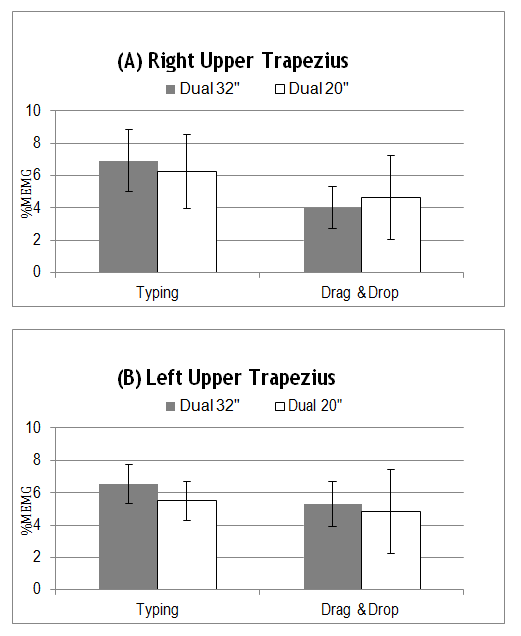
The activity of the left sternocleidomastoid muscle was significantly influenced by the larger monitor size during both the typing and mousing tasks. As the monitor size increased, so did the EMG activity for this muscle (Tables 1 and 2). Similarly, the left upper trapezius was also influenced by the monitor size during the typing task (Table 1). Corrective lenses and glasses did not have any effect on the muscle groups when compared to participants without glasses or contact lenses (Tables 3 and 4). Muscle activity response between genders was The upper trapezius muscles experienced more contractions during the typing tasks whereas the drag- and-drop game trended towards elevated muscle activity of the sternocleidomastoid muscles.
evaluated and analysis showed that gender did not act as a factor influencing muscle activity.
| Dual 32" monitors | Dual 20" monitors | p -Value | |
|---|---|---|---|
| Right Sternocleidomastoid | 4.2(0.8) | 3.7(1.1) | 0.077 |
| Left Sternocleidomastoid | 4.1(1.0) | 2.9(1.4) | 0.001 |
| Right Upper Trapezius | 6.9(1.9) | 6.3(2.3) | 0.232 |
| Left Upper Trapezius | 6.5(1.2) | 5.5(1.2) | 0.001 |
Table 1: RMS muscle activity expressed in %MEMG during typing task for different workstation conditions (one standard deviation i
| Dual 32" | Dual 20" | p -Value | |
|---|---|---|---|
| Right Sternocleidomastoid | 4.7(0.8) | 4.2(1.4) | 0.1 |
| Left Sternocleidomastoid | 5.7(1.9) | 4.7(1.3) | 0.021 |
| Right Upper Trapezius | 4.0(1.3) | 4.6(2.6) | 0.254 |
| Left Upper Trapezius | 5.3(1.4) | 4.8(2.6) | 0.345 |
Table 2: RMS muscle activity expressed in %MEMG during drag-and-drop game for different workstation conditions (one standard devi
| Glass/Contacts | No Correction | p –Value | |
|---|---|---|---|
| Right Sternocleidomastoid | 3.9(1.3) | 4.1(1.2) | 0.597 |
| Left Sternocleidomastoid | 3.3(1.5) | 3.7(2.6) | 0.445 |
| Right Upper Trapezius | 6.0(2.1) | 5.9(2.1) | 0.841 |
| Left Upper Trapezius | 5.1(1.4) | 5.2(2.5) | 0.907 |
Table 3: Glasses and contacts did not have an effect on RMS muscle activity expressed in %MEMG for tasks using the 20” monitor la
| Glass/Contacts | No Correction | p -Value | |
|---|---|---|---|
| Right Sternocleidomastoid | 4.5(0.8) | 4.3(0.9) | 0.431 |
| Left Sternocleidomastoid | 4.4(1.3) | 4.2(1.0) | 0.441 |
| Right Upper Trapezius | 5.7(1.4) | 5.8(2.4) | 0.823 |
| Left Upper Trapezius | 5.9(1.4) | 6.0(1.5) | 0.751 |
Table 4: Glasses and contacts did not have an affect on RMS muscle activity expressed in %MEMG for tasks using the 32” monitor la
There is a general trend of positive correlation in RMS EMG muscle activity with increasing screen size when participants engaged in the activities using the larger 32” monitors, with the exception of little impact from the drag-and-drop task on the right upper trapezius muscle (Figure 2 and Figure 3). The Tukey HSD all-pairwise comparison tests revealed that the reading and typing task resulted in higher levels of muscle activity for the left upper trapezius using the larger display monitors versus the smaller display monitors. Tukey HSD results showed significantly higher levels of activity while using the 32 inch displays on the left sternocleidomastoid during the typing task and for the left sternocleidomastoid muscle during the drag-and-drop activity.
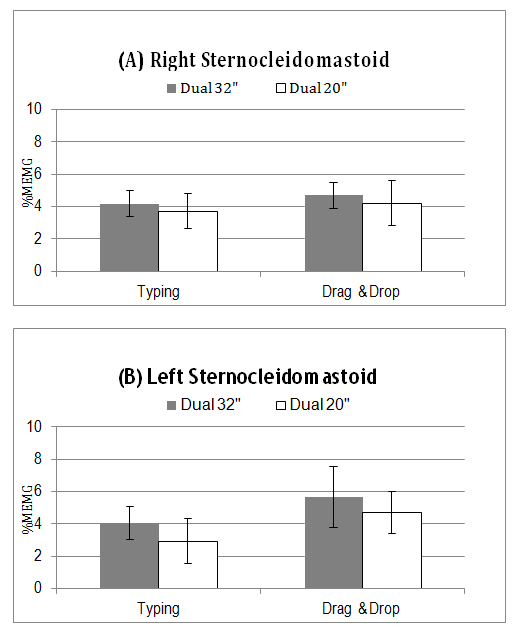
Fıgure 2: Task-based EMG activity of sternocleidomastoid muscles expressed as s%MEMG. Error bars indicate one standard deviation.
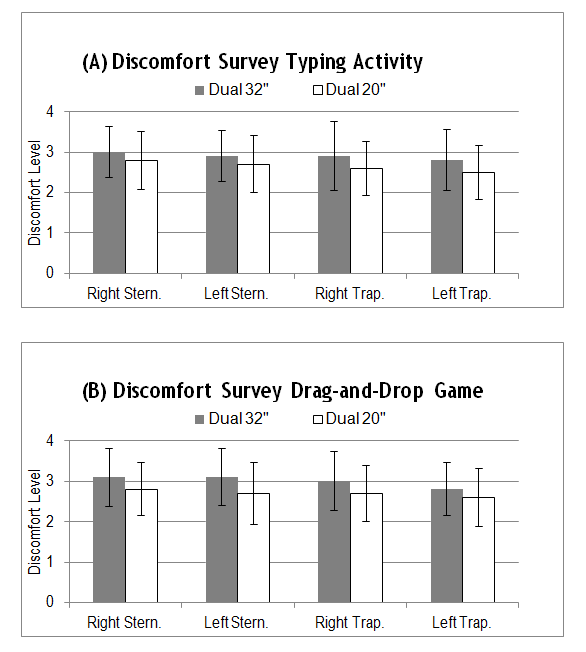
Fıgure 3: Task-based EMG activity of upper trapezius muscles expressed as %MEMG. Error bars indicate one standard deviation.
The subjective questionnaire indicates that tasks performed when using the larger 32 inch monitors caused the individual to experience slightly more discomfort than while using the smaller monitors. The highest levels of discomfort were reported when the participants engaged in the drag-and-drop mousing game as shown in Figure 4.
Discussion
The presence of dual monitors in both the workplace and home environments is becoming increasingly popular. A study by the University of Utah showed that increasing the size of a monitor from 18” to 24” increases worker productivity by as much as 2.5 hours gained per day and that dual monitor configurations also dramatically increase productivity [24]. The project aimed to gain quantitative and qualitative statistically relevant information that could provide information on what is the best monitor size to use in a dual computer workstation environment to minimize neck discomfort.
The results from this study showed that muscle activity increases in the postural muscles of the left sternocleidomastoid and the left upper trapezius when an individual is performing typing activities while working at a large 32” dual monitor workstation as compared to a dual 20” monitor workstation. The results from the subjective discomfort survey positively correlate with the results of the sEMG RMS data analysis, as there was a slight increase in discomfort experienced by the volunteer during the typing tasks using the larger video display units.
The EMG sternocleidomastoid muscle activity was 4.0 %MVC, which is similar to reported %MVC levels from previous studies by Nimbarte, et al. and Turville, et al. [14, 25], respectively 3.8% MVC and 2.6% MVC. The EMG reading from the upper trapezius muscles in this study was 6.6% MVC, comparable to the recording of 5.4% MVC by Szeto, et al. [21].
The study by Nimbarte, el al. [14] showed increases in EMG muscle activity of the right sternocleidomastoid when using dual monitors versus a smaller single monitor configuration. This study supported those findings and showed that increasing the size of the displays also increased muscle activity of the sternocleidomastoid, independent of task category. The drag- and-drop task showed statistically relevant positive trends between muscle activity and size of display for the sternocleidomastoid muscles, the muscles responsible for head-neck rotation. Increased loads on the postural muscles of neck and shoulders are known to increase the risk for work-related musculoskeletal disorders [26]. These findings may indicate that computer users may rotate their neck to greater extents while performing drag-and-drop tasks as compared to typing. Conversely, the upper trapezius muscles experienced higher activity levels during the typing exercise as compared with the mousing drag-and-drop game.
The upper trapezius EMG results exceeded 5% MVC for both sets of monitor layouts during the typing task. Tasks requiring outputs of greater than 5% MVC for prolonged periods are shown to elevate muscle fatigue and the risk for musculoskeletal pain of the neck [27]. This finding suggests that both the 20 inch displays and the 32 inch displays are still too large to mitigate the risk for developing neck and shoulder related MSDs when performing typing activities.
This study signifies that there is a statistically significant relationship between neck and shoulder muscle engagement and visual display unit size, even during a short duration time of 2.5 minutes per task. This was expected simply due to the fact that the larger screen sizes required the subject to rotate the head on a wider range than did the smaller size monitors. While this may be mitigated by moving the larger monitors farther away from the user. However, this defeats the purpose of having a large screen.
Furthermore, the subjective questionnaire while not statistically significant, does indicate that tasks performed when using the larger monitors caused the individuals to experience slightly more discomfort than while using the smaller monitors. The highest levels of discomfort were reported when the participants engaged in the drag-and- drop mousing game.
Future studies could be done to mitigate the limitations of this study. This may involve to evaluate whether-or-not specific computer tasks may influence the likelihood of specific muscle fatigue and certain wMSDs. Additional research should lengthen the period of time that the participant interfaces with the computer monitors, should incorporate EMG reading variations resulting from different monitor layout angle and tilt configurations [28] and should include a third set of dual monitors that are smaller than the 20 inch displays. Integrating 3D head-neck postural assessments during task activities similar to Nimbarte, et al. [14] realized would also benefit future studies and strengthen conclusions. Incorporating the smaller displays into the research may drop %MVC muscle activity to below 5% and help to pinpoint the ideal monitor size for dual workstations to reduce neck and shoulder muscle fatigue and discomfort [29].
Conclusions
Whether it is to increase productivity of staff or attract new talent by the aesthetic, large dual computer monitors are becoming the trend in office environments. This workstation layout may come with hidden negative impacts on the workers in the form of increased neck- shoulder muscle activity that may increase neck discomfort and potentially elevate the risk for region specific musculoskeletal disorders. This study aimed to determine whether increasing size of dual monitors would have an effect on neck and shoulder muscle activity. The results of the study show that customary office computer tasks performed on larger computer monitors does increase neck-shoulder muscle activity, which in turn may increase the risk of developing a musculoskeletal disorder in the neck and shoulders. Furthermore, subjective questionnaires while not statistically significant supported the notion that larger dual screen sizes produced more reported discomfort than smaller ones.
Occupational Applications: Large dual computer monitors and displays are becoming increasingly more common in workplace environments. This study compares neck muscle activity of computer users while performing common tasks on two, 32” dual monitors as compared to two, 20” dual monitors. The results show that increasing the size of the dual monitor increases the amount of neck and shoulder muscle activity required to perform an identical task while using a smaller dual monitor.
References
-
WMSD (2013) Work-Related Musculoskeletal Disorders (WMSD) Prevention.
-
Punnett L, Wegman DH (2004) Work-related musculoskeletal disorders: the epidemiologic evidence and the debate. Journal of Electromyography and Kinesiology 14(1): 13-23.
-
Bernard BP (1997) Musculoskeletal disorders and workplace factors: a critical review of epidemiologic evidence for work-related musculoskeletal disorders of the neck, upper extremity, and low back Musculoskeletal disorders and workplace factors: a critical review of epidemiologic evidence for work- related musculoskeletal disorders of the neck, upper extremity, and low back. NIOSH.
-
Bergqvist U, Wolgast E, Nilsson B, Voss M (1995) Musculoskeletal disorders among visual display terminal workers: individual, ergonomic, and work organizational factors. Ergonomics 38(4): 763-776.
-
Villanueva MB, Sotoyama M, Jonai H, Takeuchi Y, Saito S (1996) Adjustments of posture and viewing parameters of the eye to changes in the screen height of the visual display terminal. Ergonomics 39(7): 933- 945.
-
Villanueva MB, Jonai H, Sotoyama M, Hisanaga N, Takeuchi Y (1997) Sitting posture and neck and shoulder muscle activities at different screen height settings of the visual display terminal. Ind Health 35(3): 330-336.
-
Nielsen J (2012) Computer Screens Getting Bigger.
-
Buckle PW, Devereux JJ (2002) The nature of work- related neck and upper limb musculoskeletal disorders. Applied ergonomics 33(3): 207-217.
-
Ariëns GA, Bongers PM, Hoogendoorn WE, Houtman IL, van der Wal G, et al. (2001) High quantitative job demands and low coworker support as risk factors for neck pain: results of a prospective cohort study. Spine (Phila Pa 1976) 26(17): 1896-1901.
-
Eriksen W, Natvig B, Knardahl S, Bruusgaard D (1999) Job characteristics as predictors of neck pain. A 4-year prospective study. J Occup Environ Med 41(10): 893-902.
-
Guzman J, Hurwitz EL, Carroll LJ, Haldeman S, Côté P, et al. (2008) A new conceptual model of neck pain: linking onset, course, and care: the Bone and Joint Decade 2000-2010 Task Force on Neck Pain and Its Associated Disorders. Spine (Phila Pa 1976) 33(S4): S14-S23.
-
Alexander R (2012) Monitor Tablet Research.
-
Richtel M (2012) In Data Deluge, Multitaskers Go to Multiscreens. The New York Times.
-
Nimbarte AD, Alabdulmohsen RT, Guffey SE, Etherton JR (2012) The Impact of Use of Dual Monitor Screens on 3D Head–Neck Posture and Activity of Neck Muscles. IIE Transactions on Occupational Ergonomics and Human Factors 1(1): 38-49.
-
Blatter B, Bongers P (2002) Duration of computer use and mouse use in relation to musculoskeletal disorders of neck or upper limb. International Journal of Industrial Ergonomics 30(4): 295-306.
-
Brewer S, Van Eerd D, Amick BC 3rd, Irvin E, Daum KM, et al. (2006) Workplace interventions to prevent musculoskeletal and visual symptoms and disorders among computer users: a systematic review. J Occup Rehabil 16(3): 317-350.
-
McCaw S (2012) Master Muscle List.
-
Netter F (2006) Netter's Atlas of Human Anatomy. 4th (Edn.), Saunders Elsevier, Pennsylvania.
-
Korhonen T, Ketola R, Toivonen R, Luukkonen R, Häkkänen M (2003) Work related and individual predictors for incident neck pain among office employees working with video display units. Occup Environ Med 60(7): 475-482.
-
IDC (2013) IDC Lowers Forecast Growth for PC Monitors While Average Screen Size Increases.
-
Szeto GPY, Chan CCY, Chan SKM, Lai HY, Lau EPY (2012) A study on neck-shoulder muscle activity when using a single computer display screen versus two screens concurrently. Network of Ergonomics Societies Conference (SEANES), Southeast Asian.
-
Ltd TT (2014) FlexComp InfinitiTM Hardware Manual.
-
Wijsman J, Grundlehner B, Penders J, Hermens H (2011) Trapezius muscle EMG as predictor of mental stress. Journal of ACM Transactions on Embedded Computing Systems 12(4): 99.
-
Utah (2008) Increasing Monitor Size Translates to Higher Worker Productivity, NEC Display/University of Utah Study Finds.
-
Turville KL, Psihogios JP, Ulmer TR, Mirka GA (1998) The effects of video display terminal height on the operator: a comparison of the 15° and 40° recommendations. Applied Ergonomics 29(4): 239- 246.
-
Hägg GM, Aström A (1997) Load pattern and pressure pain threshold in the upper trapezius muscle and psychosocial factors in medical secretaries with and without shoulder/neck disorders. Int Arch Occup Environ Health 69(6): 423-432.
-
Jonsson B (1982) Measurement and evaluation of local muscular strain in the shoulder during constrained work. J Hum Ergol (Tokyo) 11(1): 73-88.
-
Jonai H, Villanueva MBG, Takata A, Sotoyama M, Saito S (2002) Effects of the liquid crystal display tilt angle of a notebook computer on posture, muscle activities and somatic complaints. International journal of industrial ergonomics 29(4): 219-229.
-
Bureau of Labor Statistics (BLS) (2005) Lost- Worktime injuries and illnesses: Characteristics and resulting days away from work, 2003. Washington DC.
- The Expanding Landscape of Road Rage: A Systematic Review of Conflicts Involving Drivers, Pedestrians, and Micromobility
- Validating Cognitive Models of Royal Navy Performance on Control Systems
- Comparing Standard and State-of-the-art Firefighter Coats on Postural Balance and Gait in a Live Burn Environment
- Investigating the Integration of Telemedicine into Clinicians Workflow: A Review of Methods
- Risk Assessment of Ergonomic Factors in a Textile Firm by RULA, REBA and Fine Kinney Methods
- Impact of Self-Esteem Training on Individuals with Disabilities Aged 17-30